
Table of Contents
Every website owner wants higher Google rankings, more organic traffic, and better conversions. Yet many businesses spend months creating content without understanding why their pages fail to rank. In most cases, the problem isn’t the content alone—it’s the website’s SEO health.
This is where an SEO audit becomes essential.
An SEO audit is like a complete health check-up for your website. It helps identify technical issues, content gaps, indexing problems, slow-loading pages, broken links, and other factors that may be preventing your site from performing well in search results.
Whether you run an eCommerce store, a corporate website, a Shopify store, a WordPress blog, or a local business website, conducting regular SEO audits can help you improve visibility, user experience, and long-term search engine performance.
In this guide, you’ll learn what an SEO audit is, why it matters, how to perform one step by step, and the best practices to keep your website optimized for Google’s latest algorithm updates.
What Is an SEO Audit?

An SEO audit is the process of analyzing every important aspect of a website to determine how well it is optimized for search engines. The goal is to identify issues that affect crawling, indexing, page experience, content quality, and overall search visibility.
Think of an SEO audit as a roadmap. Instead of guessing why your website isn’t ranking, an audit provides data-driven insights into what’s working, what isn’t, and what needs improvement.
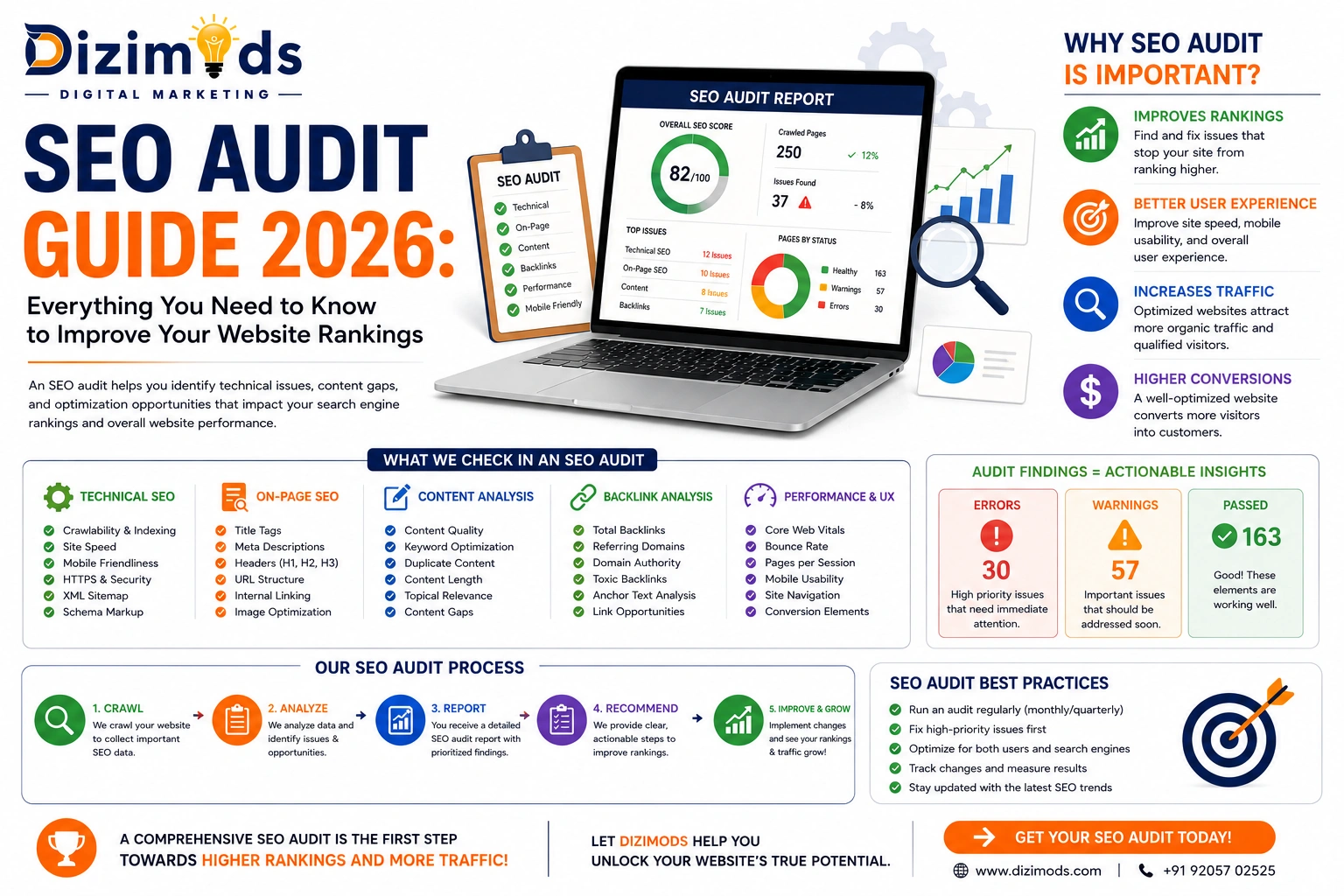
A complete SEO audit typically covers:
- Technical SEO
- On-page SEO
- Website speed
- Core Web Vitals
- Mobile usability
- Internal linking
- XML sitemap
- Robots.txt
- Structured data
- Backlink profile
- Content quality
- Keyword optimization
When performed regularly, an SEO audit helps ensure that your website aligns with Google’s latest best practices and provides a better experience for both users and search engines.
Read More Blog: What Is Technical SEO
Why Is an SEO Audit Important?

Search engine algorithms evolve constantly. A website that ranked well last year may lose visibility today due to technical issues, outdated optimization practices, or increased competition.
Regular SEO audits help you stay ahead by identifying and fixing problems before they impact your rankings.
Some of the biggest benefits include:
Improve Search Engine Rankings
An SEO audit uncovers technical and content-related issues that may be holding your website back. Fixing these problems can improve your chances of ranking for valuable keywords.
Increase Organic Traffic
Better rankings lead to higher visibility, which naturally increases organic traffic without relying on paid advertising.
Enhance User Experience
Fast-loading pages, mobile-friendly layouts, clear navigation, and error-free browsing improve user satisfaction and reduce bounce rates.
Identify Technical Problems
Issues such as broken links, crawl errors, duplicate content, redirect chains, or incorrect canonical tags can negatively affect SEO. An audit helps you detect and resolve them.
Stay Updated with Google’s Guidelines Google frequently updates its algorithms. Regular audits ensure your website remains compliant with current SEO standards and best practices.
Read More Blog: The Ultimate Guide to Amazon SEO
Signs Your Website Needs an SEO Audit
Many website owners don’t realize something is wrong until traffic starts dropping. Here are some common warning signs that indicate it’s time for an SEO audit:
- Organic traffic has declined.
- Important keywords have lost rankings.
- Pages are not getting indexed.
- Website speed has become slow.
- High bounce rate on key landing pages.
- Increase in crawl errors.
- Core Web Vitals are failing.
- Duplicate content issues.
- Broken internal links.
- Significant drop in conversions from organic traffic.
If you notice one or more of these issues, conducting a comprehensive SEO audit should be your next priority.
Read More Blog: 10 Best SEO Companies in India 2026 Edition
Different Types of SEO Audits

A complete SEO audit isn’t limited to one area. It consists of several specialized audits that evaluate different aspects of your website.
1. Technical SEO Audit
This audit focuses on the technical foundation of your website, including crawlability, indexing, site architecture, XML sitemaps, robots.txt, HTTPS security, canonical tags, structured data, and Core Web Vitals.
Without a strong technical foundation, even high-quality content may struggle to rank.
2. On-Page SEO Audit
An on-page audit evaluates how well individual pages are optimized for their target keywords.
It includes checking the following:
- Title tags
- Meta descriptions
- Header tags
- URL structure
- Internal linking
- Keyword placement
- Image optimization
- Content quality
- User intent
3. Content SEO Audit
Content plays a major role in organic rankings. A content audit helps identify pages that need updating, merging, improving, or removing.
Questions to ask during a content audit include:
- Is the content original and valuable?
- Does it satisfy search intent?
- Is it up to date?
- Are keywords naturally integrated?
- Does it include internal links?
- Is the content easy to read?
4. Off-Page SEO Audit
Off-page SEO focuses on your website’s authority and backlink profile.
This audit examines:
- Quality of backlinks
- Toxic links
- Referring domains
- Anchor text distribution
- Brand mentions
- Competitor backlink opportunities
5. Local SEO Audit
If your business targets local customers, a local SEO audit is essential.
It involves reviewing:
- Google Business Profile
- NAP consistency
- Local citations
- Customer reviews
- Local landing pages
- Location-based keywords
Read More Blog: Best SEO Company in India
How Often Should You Perform an SEO Audit?
There isn’t a one-size-fits-all answer, but a good rule of thumb is the following:
- Monthly: Monitor indexing, crawl errors, and Core Web Vitals.
- Quarterly: Perform a complete technical and on-page audit.
- After a website redesign: Audit immediately to catch broken redirects, missing metadata, or indexing issues.
- After major Google algorithm updates: Review rankings and site health to identify any new issues.
Regular audits help prevent small problems from turning into major ranking losses.
Read More Blog: SEO eCommerce Strategies for Online Stores in 2026
What Happens If You Never Audit Your Website?
Ignoring SEO audits can lead to:
- Declining keyword rankings
- Reduced organic traffic
- Poor user experience
- Lower conversion rates
- Indexing problems
- Duplicate content
- Increased crawl errors
- Loss of competitive advantage
Over time, these issues can significantly impact your website’s visibility and business growth.
Read More Blog: Amazon Sales with Reviews & SEO
Complete SEO Audit Checklist (2026)
A successful AI SEO audit starts with checking the technical health of your website. Instead of making random SEO changes, follow a structured checklist so that every important element is reviewed.
Below is the same process our SEO specialists follow while auditing business websites, Shopify stores, WordPress websites, and eCommerce platforms.
1. Check Website Crawlability

The first step is to ensure that Google can access your website properly.
If Googlebot cannot crawl your pages, those pages cannot appear in search results.
During your crawlability audit, check:
- Broken internal links
- Crawl errors
- Redirect chains
- Redirect loops
- Orphan pages
- Server response errors
- Blocked resources
Best Practice
Use Google Search Console and Screaming Frog SEO Spider to identify crawl issues.
2. Review Website Indexing

Not every crawled page gets indexed.
Many websites lose traffic simply because important pages never enter Google’s index.
Open Google Search Console and review:
- Indexed pages
- Excluded pages
- Duplicate pages
- Soft 404 errors
- Alternate pages
- Noindex pages
- Discovered – Currently Not Indexed
- Crawled – Currently Not Indexed
Common Problems
- Important pages marked as Noindex
- Thin content
- Duplicate URLs
- Weak internal linking
- Poor page quality
Fixing indexing problems often leads to faster ranking improvements than publishing new content.
3. Audit XML Sitemap

Your XML Sitemap tells Google which pages deserve to be crawled.
A poor sitemap wastes crawl budget.
A good sitemap should include:
✔ Service Pages
✔ Product Pages
✔ Category Pages
✔ Blog Articles
✔ Landing Pages
Do NOT include:
❌ Redirect URLs
❌ 404 Pages
❌ Duplicate Pages
❌ Noindex Pages
❌ Parameter URLs
Pro Tip
Whenever you publish a new blog or service page, update and resubmit your sitemap in Google Search Console.
4. Check Robots.txt File

The Robots.txt file controls which parts of your website search engines can access.
Many websites accidentally block important folders.
Review:
- User-agent rules
- Disallow rules
- Sitemap location
- Blocked resources
- CSS accessibility
- JavaScript accessibility
One incorrect line inside Robots.txt can remove hundreds of pages from Google.
Read More Blog: How Dizimods Builds Trust and Boosts Sales 2026
5. Analyze Website Architecture
Google prefers websites with a clean structure.
A visitor should reach every important page within three or four clicks.
Ideal structure:
Home
↓
Services
↓
Category
↓
Sub Category
↓
Blog or Product
Avoid extremely deep navigation.
A simple architecture improves crawling and user experience.
6. Website Speed Audit

Website speed has become one of Google’s most important ranking signals.
A slow website not only hurts rankings but also reduces conversions.
During your audit, check:
- Largest images
- Render-blocking resources
- JavaScript execution
- CSS optimization
- Browser caching
- Lazy loading
- Font loading
- Server response time
Speed Optimization Checklist
- Convert images into WebP
- Compress large files
- Remove unused CSS
- Remove unused JavaScript
- Enable browser caching
- Use CDN
- Optimize hosting performance
Even a one-second improvement can significantly improve user engagement.
7. Core Web Vitals Audit

Google now measures real user experience through Core Web Vitals.
Pay close attention to these metrics:
Largest Contentful Paint (LCP)
Measures how quickly the main content loads.
Target:
Less than 2.5 seconds
Interaction to Next Paint (INP)
Measures how quickly your website responds to user interactions.
Lower response times create a smoother browsing experience.
Cumulative Layout Shift (CLS)
Measures visual stability.
If buttons or images move while loading, users may click the wrong element.
Aim for a CLS score below 0.1.
8. Mobile SEO Audit

Google uses mobile-first indexing.
That means Google primarily evaluates the mobile version of your website.
Check:
- Responsive design
- Mobile navigation
- Font size
- Button spacing
- Image scaling
- Mobile loading speed
- Touch-friendly layout
If your website performs poorly on mobile devices, rankings will likely suffer.
Read More Blog: Top SEO Companies In India That Actually Deliver Results
9. HTTPS & Security Audit
Google considers HTTPS a trust signal.
Review:
- SSL Certificate
- Mixed Content Errors
- HTTP to HTTPS Redirects
- Secure Internal Links
A secure website protects user data while improving credibility.
10. Canonical Tag Audit

Duplicate content confuses search engines.
Canonical tags tell Google which page should be treated as the original version.
Check for:
- Missing Canonicals
- Self-referencing Canonicals
- Multiple Canonicals
- Incorrect Canonical URLs
This is especially important for eCommerce websites with filter and sorting URLs.
11. URL Structure Audit

Clean URLs improve both SEO and user experience.
Good Example:
yourdomain.com/seo-audit-guide
Poor Example:
yourdomain.com/page?id=546&cat=seo
URL Best Practices
- Keep URLs short.
- Use lowercase letters.
- Include the primary keyword.
- Separate words with hyphens.
- Remove unnecessary numbers or parameters.
12. Image SEO Audit
Images can improve rankings—but only if optimized correctly.
Review every important image for:
- Large file size
- Missing Alt Text
- Generic filenames
- Missing lazy loading
- Incorrect dimensions
Example:
❌ IMG0001.jpg
✔ seo-audit-checklist.webp
Optimized images improve both page speed and accessibility.
Read More Blog: Ecommerce SEO Guide: How to Rank Your Online Store on Google
13. Internal Linking Audit
Internal links help Google understand your site’s hierarchy.
During your audit, ask:
- Are important pages receiving enough internal links?
- Are there orphan pages?
- Are anchor texts descriptive?
- Are related blog posts connected?
A strong internal linking strategy distributes authority across your website and improves crawl efficiency.
14. Structured Data (Schema) Audit
Schema markup helps search engines better understand your content and can increase visibility through rich results.
Check whether your website uses:
- Organization Schema
- Local Business Schema
- Article Schema
- BlogPosting Schema
- Product Schema
- FAQ Schema
- Breadcrumb Schema
- Review Schema
Validate your implementation using Google’s Rich Results Test to catch any markup errors.
Read More Blog: The Complete Guide To Ecommerce SEO in 2026
On-Page SEO Audit Checklist
After completing your technical SEO audit, the next step is to evaluate your on-page optimization. Even if your website is technically perfect, poorly optimized pages can prevent you from achieving higher rankings.
An on-page SEO audit helps ensure that every page is optimized for both search engines and users.
Review Title Tags
The title tag is one of the most influential on-page ranking factors. It tells search engines and users what your page is about.
During your audit, check whether:
- Every page has a unique title.
- The primary keyword appears naturally.
- The title is compelling enough to encourage clicks.
- The length stays between 50–60 characters.
- No pages have duplicate titles.
A well-written title not only improves rankings but also increases click-through rates from search results.
Optimize Meta Descriptions
Although meta descriptions are not a direct ranking factor, they strongly influence whether users click on your page.
An effective meta description should:
- Clearly explain the page’s purpose.
- Include the target keyword naturally.
- Stay within 150–160 characters.
- Encourage users to take action.
Avoid duplicate or automatically generated descriptions across multiple pages.
Check Heading Structure
A clear heading hierarchy makes content easier to understand for both users and search engines.
Every page should include:
- One H1 heading
- Logical H2 sections
- Supporting H3 and H4 headings where needed
Avoid using multiple H1 tags on the same page.
Evaluate Keyword Optimization
Keyword optimization is no longer about repeating the same phrase multiple times.
Instead, focus on topical relevance.
Ask yourself:
- Does the page satisfy the search intent?
- Is the primary keyword used naturally?
- Are related keywords included?
- Does the content answer common user questions?
Google rewards comprehensive content rather than keyword stuffing.
Read More Blog: E-commerce SEO Guide
Content Quality Audit
Content is often the deciding factor between a page that ranks on page one and one that never gains visibility.
During your audit, review every important page and blog post.
Check for Thin Content
Pages with very little useful information rarely perform well in search results.
Improve them by adding:
- Expert insights
- Examples
- Statistics
- Step-by-step explanations
- Visual content
- FAQs
Every page should provide enough value to fully answer the user’s query.
Remove Duplicate Content
Duplicate content confuses search engines and may dilute ranking signals.
Common sources include:
- Printer-friendly pages
- Product variations
- URL parameters
- Copied manufacturer descriptions
Whenever possible, consolidate similar content or use proper canonical tags.
Refresh Outdated Content
SEO is constantly evolving.
An article published two years ago may contain outdated recommendations.
Review older content regularly and update:
- Statistics
- Screenshots
- Examples
- Internal links
- Keywords
- Search intent
Content freshness can positively influence rankings for many topics.
Internal Linking Audit
Internal links help distribute authority throughout your website and guide users to related content.
During your audit, identify opportunities to connect relevant pages.
For example, a blog about SEO Audit can naturally link to articles covering:
- Technical SEO
- On-Page SEO
- Keyword Research
- Local SEO
- Core Web Vitals
- SEO Services
This strengthens topical relevance and helps search engines understand the relationship between your content.
External Link Audit
High-quality outbound links improve credibility when they point to trusted and relevant sources.
Check that:
- External links are still active.
- Links point to authoritative websites.
- Broken external links are replaced.
Avoid linking to spammy or irrelevant websites.
Backlink Audit

Backlinks remain one of Google’s strongest ranking signals.
However, quality matters far more than quantity.
A backlink audit helps you understand the following:
- Which websites link to you.
- Whether those links are relevant.
- If any toxic backlinks exist.
- Which pages attract the most backlinks.
- Competitor backlink opportunities.
Building authoritative backlinks should always be part of your long-term SEO strategy.
Local SEO Audit

If your business serves a specific city or region, local SEO deserves special attention.
Review the following:
- Google Business Profile information
- Business name, address, and phone number consistency
- Customer reviews
- Local citations
- Location-specific landing pages
- Local keywords
An optimized local presence increases visibility in Google Maps and local search results.
Best SEO Audit Tools
Using the right tools makes the audit process faster and more accurate.
Some of the most trusted SEO tools include:
- Google Search Console
- Google Analytics 4
- Screaming Frog SEO Spider
- Ahrefs
- SEMrush
- Google PageSpeed Insights
- Google Lighthouse
- GTmetrix
- Rich Results Test
- Bing Webmaster Tools
No single tool provides every insight, so combining multiple tools often gives the most complete picture of your website’s health.
Read More Blog: Best AI-driven SEO Company in India
Common SEO Audit Mistakes
- Ignoring crawl errors
- Publishing duplicate content
- Forgetting to optimize images
- Weak internal linking
- Slow-loading pages
- Missing schema markup
- Broken redirects
- Poor mobile usability
- Outdated content
- Incomplete metadata
Final Thoughts
An SEO audit is not just a checklist—it’s an ongoing process that helps your website stay healthy, competitive, and aligned with Google’s evolving algorithms.
By regularly reviewing technical SEO, on-page optimization, content quality, backlinks, and user experience, you can uncover opportunities that drive sustainable organic growth. Small improvements made consistently often lead to significant gains in rankings, traffic, and conversions over time.
Whether you’re managing a business website, an eCommerce store, or a personal blog, a structured SEO audit should be a core part of your digital marketing strategy.
Frequently Asked Questions (FAQs)
Result-Driven SEO Agency Backed by Experience
Built for brands that want long-term growth – not shortcuts.