

Table of Contents
A website can have excellent content and strong backlinks, but if its pages are slow, unstable, or difficult to interact with, users may leave before taking any action. This is where Core Web Vitals become important.
Core Web Vitals are a set of performance metrics used by Google to evaluate important aspects of a webpage experience, including loading performance, responsiveness, and visual stability.
For businesses investing in SEO, understanding Core Web Vitals is important because website performance affects how users experience a website and is part of Google’s broader page experience considerations.
In 2026, website owners should not look at Core Web Vitals as simply a technical score. They should focus on building pages that load efficiently, respond quickly to user interactions, and remain visually stable while loading.
This guide explains what Core Web Vitals are and why they matter for SEO services.
, the latest Core Web Vitals metrics, common problems, how to improve them, and how businesses can monitor website performance.
What Are Core Web Vitals?

Core Web Vitals are Google’s user-focused metrics for measuring key aspects of web page experience.
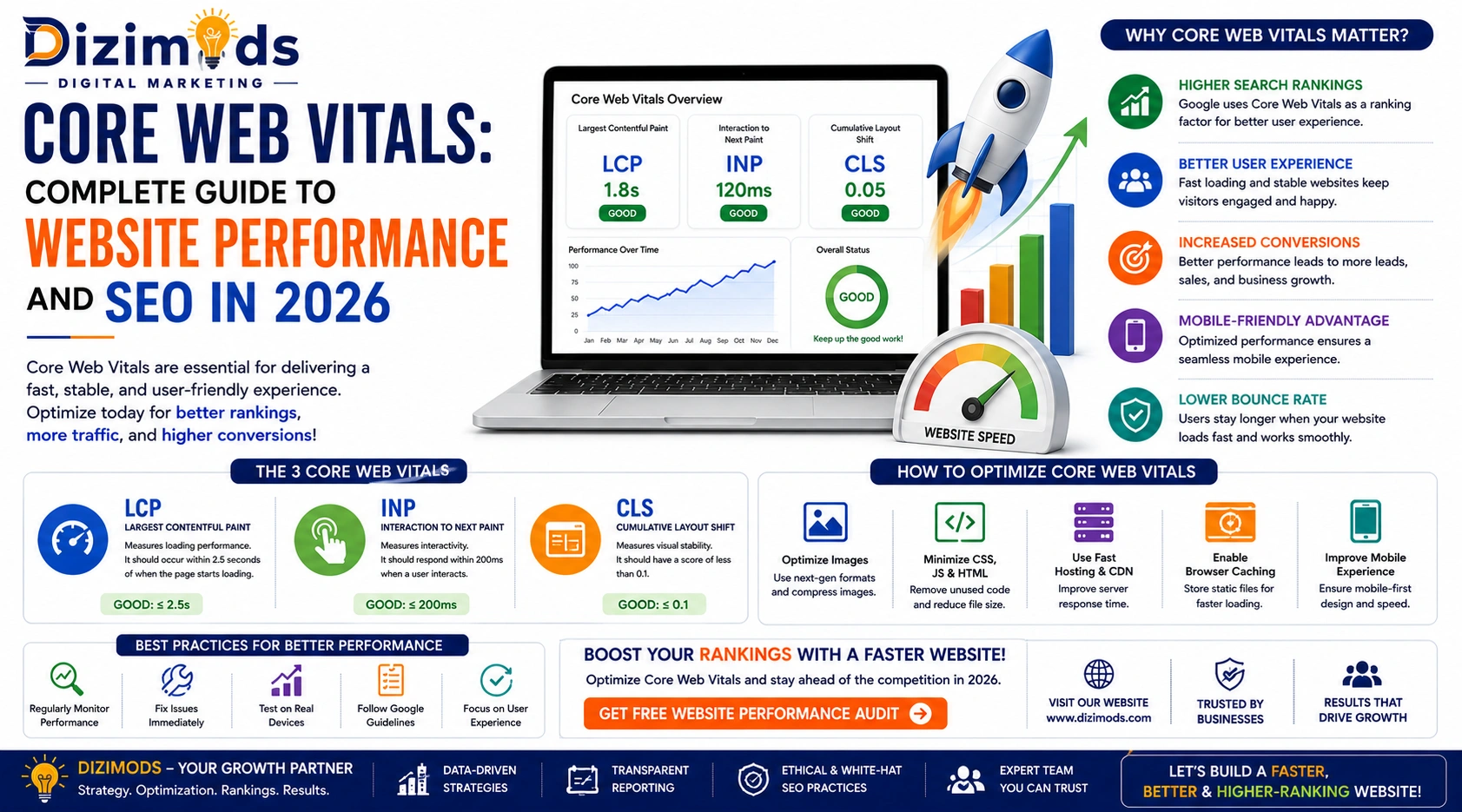
The current Core Web Vitals focus on three important areas:
- Largest Contentful Paint (LCP)—loading performance
- Interaction to Next Paint (INP)—responsiveness
- Cumulative Layout Shift (CLS)—visual stability
Each metric measures a different part of the user’s experience.
A website that performs well across these metrics provides users with a faster and more stable browsing experience.
Read Blog: SEO Mistakes to Avoid in 2026
Core Web Vitals Metrics Explained
1. Largest Contentful Paint (LCP)

Largest Contentful Paint (LCP) measures how quickly the largest visible content element becomes rendered within the user’s viewport.
This element could be:
- A large image
- Hero banner
- Video poster
- Heading
- Text block
- Product image
Google’s recommended LCP target is:
Good: 2.5 seconds or less
Needs Improvement: More than 2.5 seconds and up to 4 seconds
Poor: More than 4 seconds
If the main content takes too long to appear, users may perceive the website as slow.
Common Causes of Poor LCP
Several technical problems can increase LCP, including:
- Slow server response time
- Large images
- Unoptimized hero banners
- Render-blocking CSS
- Render-blocking JavaScript
- Excessive third-party scripts
- Poor caching
- Slow hosting
- Inefficient page rendering
- Unnecessary redirects
How to Improve LCP
Local SEO and development teams can improve LCP by:
- Optimizing large images
- Using modern image formats such as WebP or AVIF where appropriate
- Improving server response time
- Using browser caching
- Reducing render-blocking resources
- Preloading critical assets carefully
- Removing unnecessary third-party scripts
- Improving CSS delivery
- Using a CDN when appropriate
The goal is to make the most important visible content available to users as quickly as possible.
Read More: Best Amazon Account Management Services Agencies in 2026
2. Interaction to Next Paint (INP)

Interaction to Next Paint (INP) measures how responsive a webpage is when users interact with it.
For example, users may:
- Click a button
- Open a navigation menu
- Submit a form
- Add a product to a cart
- Select a product variation
- Open a dropdown
- Interact with a popup
INP looks at the responsiveness of interactions throughout the page experience.
The current recommended thresholds are:
Good: 200 milliseconds or less
Needs Improvement: More than 200 ms and up to 500 ms
Poor: More than 500 ms
A poor INP score can make a website feel unresponsive even when the page initially loads quickly.
Common Causes of Poor INP
Poor INP is often associated with:
- Heavy JavaScript
- Long-running JavaScript tasks
- Excessive DOM complexity
- Large third-party scripts
- Inefficient event handlers
- Too much client-side processing
- Unnecessary JavaScript execution
How to Improve INP
To improve INP, developers can:
- Reduce unnecessary JavaScript
- Break up long tasks
- Optimize event handlers
- Remove unnecessary third-party scripts
- Reduce JavaScript execution time
- Simplify complex page elements
- Delay non-critical scripts
- Improve interaction handling
The objective is simple: when users interact with a website, it should respond quickly.
Read Article: Off-Page SEO: The Complete Guide
3. Cumulative Layout Shift (CLS)

Cumulative Layout Shift (CLS) measures unexpected movement of visible page elements.
Have you ever tried clicking a button only for the page to move and cause you to click something else?
That is an example of poor visual stability.
Google’s recommended CLS target is:
Good: 0.1 or less
Needs Improvement: More than 0.1 and up to 0.25
Poor: More than 0.25
Common Causes of Poor CLS
CLS problems can occur because of:
- Images without defined dimensions
- Ads loading dynamically
- Embedded content without reserved space
- Late-loading fonts
- Dynamically injected content
- Popups shifting page elements
- Unstable layout components
How to Improve CLS
Developers can reduce CLS by:
- Defining image width and height
- Reserving space for advertisements
- Reserving space for embeds
- Managing web fonts properly
- Avoiding unexpected content insertion
- Maintaining stable page layouts
A visually stable website creates a much better experience for visitors.
Read More Article: On-Page SEO: The Complete Guide
Why Are Core Web Vitals Important for SEO?

Core Web Vitals are important for SEO because they measure real aspects of user experience that Google considers as part of page experience.
However, Core Web Vitals should not be treated as a shortcut to higher rankings.
Having perfect Core Web Vitals does not automatically mean that a website will rank above competitors.
Google’s search systems consider many signals, including relevance, content quality, authority, technical accessibility, and other factors.
Therefore, businesses should approach Core Web Vitals and SEO as complementary parts of a broader search strategy.
A strong SEO strategy should combine:
- Helpful content
- Search intent optimization
- Technical SEO
- Internal linking
- Structured data where appropriate
- Mobile usability
- Core Web Vitals
- Website accessibility
- Strong website architecture
- Relevant backlinks
- Continuous performance monitoring
View Blog: Google Ranking Factors 2026
Core Web Vitals and User Experience
SEO is ultimately connected to the user experience.
Imagine two websites selling similar products.
Website A:
- Loads quickly
- Main content appears quickly
- Buttons respond quickly
- Layout remains stable
Website B:
- Takes several seconds to load
- Main image appears late
- Buttons feel slow
- Content jumps while loading
Even if both websites offer similar information, Website A can provide a much better experience.
This is why Core Web Vitals optimization should not be viewed only as an SEO task.
It is also a website performance and conversion optimization task.
View Article: Link Building Guide 2026
How Core Web Vitals Affect Ecommerce Websites

Ecommerce websites often contain more functionality than simple business websites.
A typical e-commerce page may include:
- Product images
- Product filters
- Reviews
- Product variations
- Shopping cart functionality
- Recommendation widgets
- Tracking scripts
- Payment integrations
- Chat tools
- Marketing pixels
All these elements can affect website performance.
For e-commerce businesses, poor Core Web Vitals can create friction during the customer journey.
For example, if a product page takes too long to load, a visitor may leave before viewing the product.
If a filter responds slowly, browsing can become frustrating.
If a product button moves because of layout shifts, users may click the wrong element.
Therefore, Core Web Vitals optimization should be part of an e-commerce SEO strategy.
Explore Blog: Ecommerce SEO: The Complete Guide
Core Web Vitals for Mobile Websites
Mobile performance deserves special attention because users often browse websites on mobile devices and potentially less powerful networks.
A page that performs well on a high-end desktop computer may not perform equally well on a mobile device.
Mobile optimization should consider:
- Image sizes
- JavaScript execution
- Network conditions
- Font loading
- Responsive layouts
- Touch interactions
- Mobile navigation
- Third-party scripts
Businesses should test their websites across different devices and connection conditions instead of relying only on desktop performance.
Explore Article: Shopify SEO Guide
How to Check Core Web Vitals
There are several tools that AI SEO professionals and developers can use to monitor Core Web Vitals.
Google Search Console
Google Search Console provides a Core Web Vitals report that helps website owners identify URLs with performance issues.
It can help identify groups of pages that may need improvement.
PageSpeed Insights
PageSpeed Insights provides performance information and recommendations for individual URLs.
It can show both laboratory testing data and, where available, real-user performance data.
Chrome DevTools
Chrome DevTools can help developers investigate performance issues directly within the browser.
It is particularly useful for diagnosing JavaScript, rendering, network, and other technical performance problems.
Lighthouse
Lighthouse is an automated tool that audits webpages for performance and other quality-related areas.
It can help developers identify potential improvements during development and optimization.
Read Now: Local SEO Checklist: The Ultimate Guide
Core Web Vitals: Field Data vs Lab Data
One important concept in website performance optimization is the difference between field data and lab data.
Field Data
Field data represents the experiences of real users visiting a website under different conditions.
Real users may have different:
- Devices
- Browsers
- Internet connections
- Geographic locations
- Hardware capabilities
This data provides a real-world view of website performance.
Lab Data
Lab data is collected in a controlled testing environment.
It is useful for diagnosing performance issues and testing changes.
Both types of data are useful, but they serve different purposes.
A developer may use lab testing to identify the cause of a performance issue, while field data helps understand how the website performs for real visitors.
Read Full Blog: Technical SEO Guide 2026
Common Core Web Vitals Problems
Some of the most common problems found during a Core Web Vitals audit include:
Slow Server Response
If the server takes too long to respond, the browser has to wait before it can begin loading important resources.
Large Images
Unoptimized images can significantly increase page weight and slow down loading.
Too Much JavaScript
Excessive JavaScript can increase processing time and negatively affect responsiveness.
Render-Blocking Resources
CSS and JavaScript can prevent important content from rendering quickly.
Poor Font Loading
Web fonts can sometimes cause text visibility and layout stability problems if they are not handled correctly.
Third-Party Scripts
Analytics, advertising, chat widgets, social integrations, and other external scripts can affect page performance.
Layout Instability
Images, advertisements, banners, or dynamically loaded components can cause unexpected movement.
Read Full Article: Top 10 Social Media Marketing Agencies in India
Core Web Vitals Optimization Checklist

- Check LCP performance.
- Check INP performance.
- Check CLS performance.
- Optimize large images.
- Compress website assets.
- Review JavaScript.
- Remove unnecessary scripts.
- Improve server response time.
- Review caching.
- Check render-blocking resources.
- Define image dimensions.
- Review third-party integrations.
- Test mobile performance.
- Monitor real-user performance.
- Recheck performance after major website changes.
How Dizimods Can Help With Core Web Vitals

At Dizimods, website performance should be treated as an important part of a complete SEO strategy.
A Core Web Vitals audit can help identify performance issues that may affect how users experience a website.
Depending on the website, optimization may involve reviewing:
- LCP issues
- INP issues
- CLS problems
- Image optimization
- JavaScript
- CSS
- Server response
- Caching
- Mobile performance
- Third-party scripts
- Page structure
- Technical SEO
The exact solution depends on the website’s technology, hosting environment, CMS, plugins, theme, integrations, and existing implementation.
For WordPress development, WooCommerce development, Shopify development, custom PHP websites, e-commerce platforms, and other websites, performance optimization should be based on the actual technical setup rather than applying the same solution to every website.
Read More: What is a long-tail keyword
Core Web Vitals and Technical SEO: What Is the Difference?
Technical SEO covers a much broader area than Core Web Vitals.
Technical SEO can include:
- Crawling
- Indexing
- XML sitemaps
- Robots.txt
- Canonical URLs
- Redirects
- Website architecture
- Structured data
- Mobile optimization
- JavaScript SEO
- Page performance
- Core Web Vitals
Therefore, Core Web Vitals are one component of technical SEO and website performance optimization, not the entire technical SEO process.
Read Blog: Search Engine Basics
Should Every Website Aim for Perfect Core Web Vitals?
Not necessarily.
The goal should be to provide a fast, responsive, and stable experience for users rather than chasing a perfect laboratory score.
A website may have a good PageSpeed score but still experience problems for real users.
Similarly, a small difference in a performance score should not be prioritized over a serious usability or conversion problem.
Businesses should focus on meaningful improvements that improve real user experience.
Read Latest Blog: Top 10 SEO Companies in India to Engage in 2026
Core Web Vitals Best Practices for 2026
For businesses working on Shopify SEO in 2026, the following practices can help maintain website performance:
Optimize Images
Use appropriately sized images and modern formats where suitable.
Keep JavaScript Under Control
Only load and execute scripts that are necessary.
Improve Server Performance
A faster server response can help pages begin loading sooner.
Use Efficient Caching
Caching can reduce repeated server processing and improve loading performance.
Avoid Unexpected Layout Changes
Reserve appropriate space for images, ads, embeds, and dynamic content strategy.
Monitor Real Users
Do not rely only on one desktop test. Monitor real-world performance where data is available.
Test After Website Changes
New plugins, themes, apps, scripts, tracking codes, and website features can change performance.
Regular monitoring can help identify regressions before they become larger problems.
Read the Article: 10 Best SEO Companies in India 2026
Conclusion
Core Web Vitals are an important part of modern website performance and technical SEO. LCP, INP, and CLS measure three critical aspects of user experience: loading performance, responsiveness, and visual stability.
For businesses, improving Core Web Vitals is not simply about achieving a better score in a testing tool. The real objective is to create a website that loads efficiently, responds quickly, remains stable, and makes it easy for users to find and interact with information.
A strong SEO strategy should combine Core Web Vitals optimization, technical SEO, useful content, search intent, mobile optimization, website architecture, and ongoing performance monitoring.
If your website is experiencing slow loading, poor responsiveness, layout shifts, or declining performance, a detailed Core Web Vitals and technical SEO audit can help identify the underlying issues and prioritize the right improvements.
Frequently Asked Questions
Result-Driven SEO Agency Backed by Experience
Built for brands that want long-term growth – not shortcuts.