

Table of Contents
A website can have great content, but if its pages are not properly connected, both users and search engines may struggle to discover important information. This is where internal linking becomes an important part of SEO.
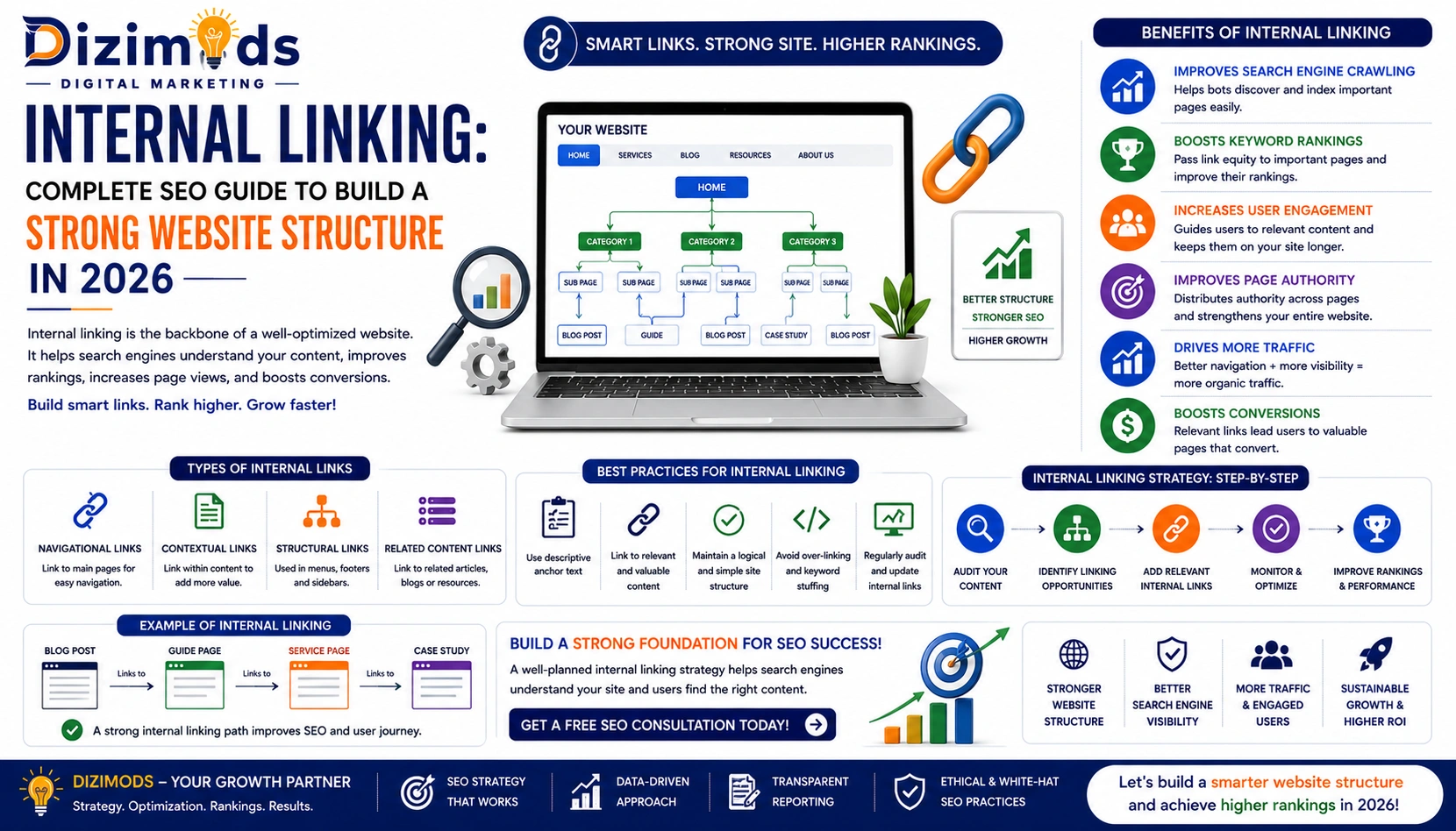
Internal links connect one page of a website to another page on the same website. They help users move between related topics and can help search engines discover and understand the relationship between different pages.
A well-planned internal linking strategy can improve website navigation, strengthen topical relationships, distribute internal link signals, and help important pages become easier to discover and crawl.
However, effective internal linking is not about adding as many links as possible. The goal is to create useful connections between relevant pages.
In this complete guide, we will explain what internal linking is, why it matters for SEO, different types of internal links, internal linking strategies, anchor text best practices, common mistakes, and how businesses can build a stronger website structure.
Read More: Google Ranking Factors 2026
What Is Internal Linking?
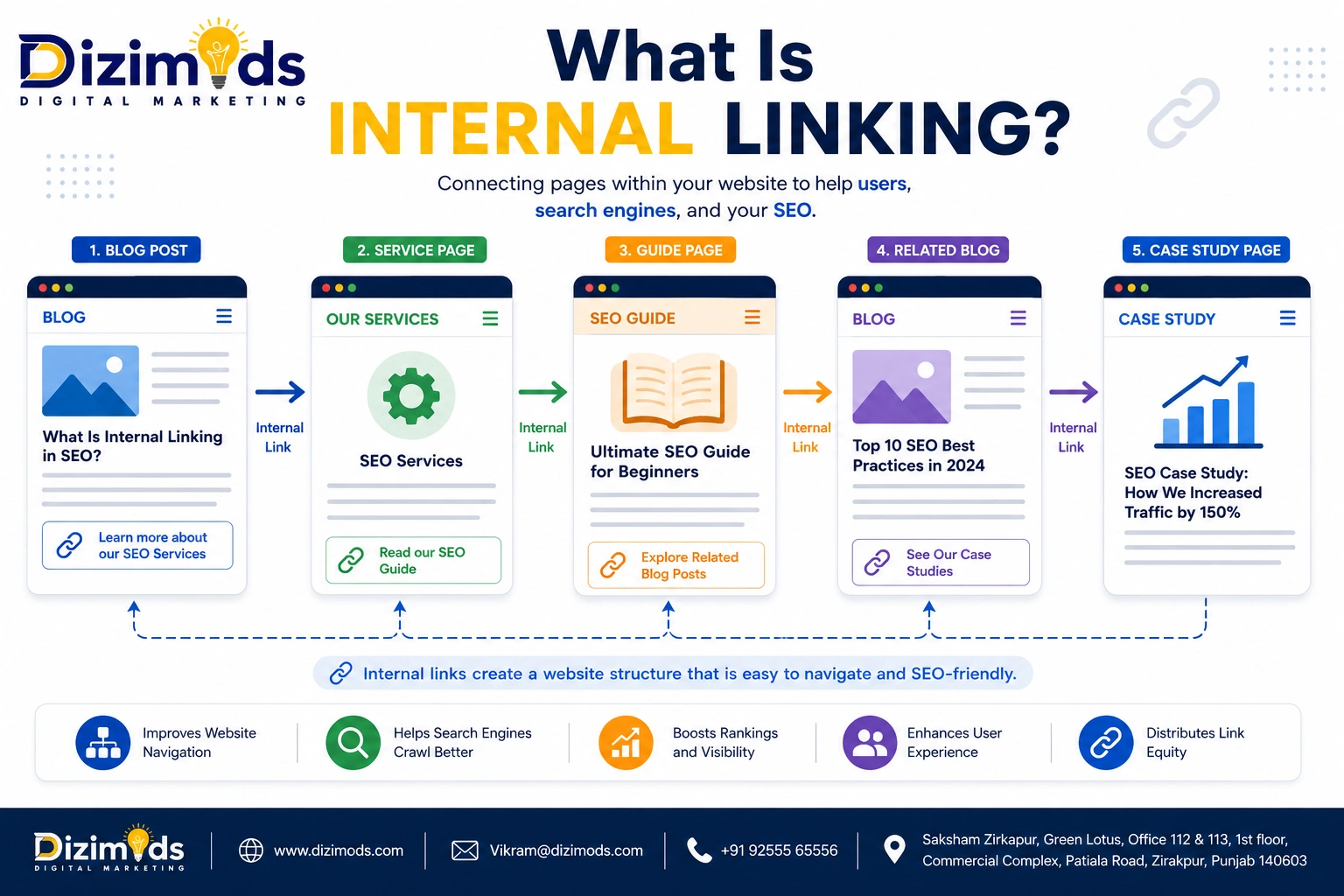
Internal linking is the practice of linking one page on a website to another page on the same website.
For example, a blog post about keyword research could naturally link to another relevant page about SEO services.
An internal link may connect:
- A blog post to another blog post
- A blog post to a service page
- A service page to a related service
- A category page for individual articles
- A product page to related products
- A homepage with important website sections
Internal links help create relationships between different pages and make website navigation easier.
Simple Example
Suppose a website has these pages:
Home → SEO Services → Technical SEO → Core Web Vitals
An internal link from the Technical SEO page to the Core Web Vitals article creates a logical connection between two related topics.
This is a simple example of an SEO internal linking structure.
Read Full Blog: Ecommerce SEO: The Complete Guide
Why Is Internal Linking Important for SEO?

Internal linking has several important roles in SEO.
1. Helps Search Engines Discover Pages
Search engines use links to discover and navigate between pages.
A page that is properly linked from other relevant pages can be easier for search engines to find and crawl.
This becomes particularly important for large websites with hundreds or thousands of URLs.
2. Helps Search Engines Understand Website Structure
Internal links create relationships between pages.
For example:
SEO
→ Keyword Research
→ Technical SEO
→ Local SEO
→ Ecommerce SEO
→ On-Page SEO
This structure can help communicate which pages are related to a broader topic.
3. Helps Users Navigate the Website
Internal links are not only for search engines.
They help visitors find additional information without returning to Google.
For example, someone reading about technical SEO may want to learn about:
- Core Web Vitals
- XML sitemaps
- Canonical tags
- Robots.txt
- Website crawling
Relevant internal links can take the user directly to those resources.
4. Helps Distribute Internal Link Signals
Internal links can help distribute signals throughout a website.
Pages that receive relevant links from important pages can become more prominent within the site’s internal structure.
This is one reason why a strategic internal linking strategy is better than randomly adding links.
5. Supports Topic Clusters
Internal links are an important component of topic cluster architecture.
A website may have one main pillar page supported by several related articles.
For example:
Pillar Topic: SEO Services
Supporting content:
These pages can be connected through relevant internal links.
Internal Links vs External Links
One common SEO question is the difference between internal and external links.
Internal Link
An internal link connects two pages on the same website.
Example:
Dizimods Blog → Dizimods SEO Services
External Link
An external link connects your website to another website.
Example:
Dizimods Blog → Google Search documentation
Both types of links can have value, but they serve different purposes.
Internal links primarily help with:
- Navigation
- Website structure
- Page discovery
- Topic relationships
- Internal link distribution
External links can help users access supporting information and can provide useful references when linking to authoritative sources.
Read Full Article: Shopify SEO Guide
Types of Internal Links

1. Contextual Internal Links
These are links placed naturally within the main content of a page.
Example:
Businesses can improve their website performance by working on Core Web Vitals and technical SEO.
If “Core Web Vitals” links to a relevant article, that is a contextual internal link.
These links are particularly useful because they appear within relevant content.
2. Navigation Links
Navigation menus contain links to major website sections.
For example:
- Home
- About
- Services
- Blog
- Contact
Navigation links help users access important areas of the website.
3. Breadcrumb Links
Breadcrumbs show the hierarchy of a page.
Example:
Home → Blog → SEO → Internal Linking
Breadcrumbs can make website navigation clearer and provide additional internal connections.
4. Footer Links
Footer links can provide access to important pages such as:
- About
- Contact
- Privacy Policy
- Services
- Important categories
However, a footer should not be filled with excessive keyword-rich links.
5. Related Content Links
A blog can recommend related articles at the end of an article.
For example, an article about internal linking could link to:
- Keyword Research
- On-Page SEO
- Technical SEO
- Schema Markup
- Core Web Vitals
The recommendations should genuinely relate to the article.
Explore Blog: Local SEO Checklist: The Ultimate Guide
What Is an Internal Linking Strategy?

An internal linking strategy is a planned approach to connecting pages across a website.
Instead of adding links randomly, SEO teams identify:
- Important pages
- Supporting pages
- Related topics
- Keyword relationships
- Content hierarchy
- Pages that need more internal links
- Orphan pages
- High-authority pages
Pages that need stronger contextual connections
The goal is to create a logical website structure that works for both users and search engines.
Explore More: Top 10 Social Media Marketing Agencies in India
How to Create an Internal Linking Strategy
Step 1: Identify Your Important Pages
Start by identifying pages that are important to the business.
These could include:
- Main service pages
- Product pages
- Category pages
- Location pages
- Important guides
- High-converting landing pages
These pages may deserve stronger internal linking support.
Step 2: Create Topic Clusters
Group related content into topic clusters.
For example, a digital marketing website could create a cluster around SEO.
Main Pillar Page
SEO Services
Supporting Pages
- Keyword Research
- On-Page SEO
- Technical SEO
- Local SEO
- Ecommerce SEO
- Link Building
- SEO Audit
- Core Web Vitals
The pages should be connected where the relationship makes sense.
Step 3: Find Relevant Linking Opportunities
Look for existing pages that discuss a topic related to the destination page.
For example, if you have a new page about schema markup, search your existing content for discussions about:
- Technical SEO
- Structured Data
- SEO
- Website Development
- Rich Results
Those pages may provide relevant internal linking opportunities.
Step 4: Use Descriptive Anchor Text
Anchor text is the clickable text used for a link.
Instead of:
Click here.
Use descriptive text such as:
Learn more about technical SEO.
The anchor text should naturally describe the destination page.
Step 5: Link From Relevant Pages
The best internal links usually have contextual relevance.
A page about keyword research does not need to link to an unrelated page simply because you want to increase internal links.
Relevance comes first.
Step 6: Review the Website Regularly
Internal linking is not a one-time task.
As new content is published, older pages should be reviewed for new linking opportunities.
Continue Reading: Top 10 Digital Marketing Agencies in India (2026)
Internal Linking Best Practices
A good internal linking SEO strategy follows several practical principles.
Use Relevant Links
Only link to pages that provide additional value to the reader.
Write Natural Anchor Text
Anchor text should describe the destination page naturally.
Link Important Pages
Important business pages should have appropriate internal links from relevant content.
Connect New Content With Old Content
Whenever a new blog is published, look for relevant older articles that can link to it.
Add Links From Strong Pages
Pages that already receive substantial organic traffic or have strong internal importance can provide useful pathways to other relevant pages.
Avoid Excessive Linking
More links do not automatically mean better SEO.
Every link should have a reason to exist.
Keep Website Hierarchy Clear
Internal links should help communicate the relationship between:
Homepage → Category → Subcategory → Content
Fix Broken Internal Links
Broken internal links create poor user experiences and can interfere with efficient website navigation.
Find Orphan Pages
An orphan page has no meaningful internal links pointing to it.
Important orphan pages should be reviewed and connected to relevant parts of the website.
Read the Complete Guide: 10 Best SEO Companies in India 2026 Edition
What Is Anchor Text in Internal Linking?
Anchor text is the clickable text used in a hyperlink.
For example:
Read our Technical SEO Guide.
“Technical SEO Guide” is the anchor text.
Good anchor text should:
- Describe the destination
- Be relevant to the surrounding content
- Sound natural
- Help users understand what they will find
Avoid forcing exact-match keywords into every link.
For example, if the target page is about technical SEO, repeatedly using:
Best technical SEO services company for technical SEO.
Would create an unnatural experience.
Instead, natural variations can be used:
- Technical SEO guide
- Technical SEO services
- Learn more about technical SEO
- Technical SEO optimization
Internal Linking and Topic Clusters

Topic clusters can create a powerful content architecture.
Consider a website that wants to build authority around digital marketing.
The main topic could be:
Digital Marketing
Supporting topics might include:
The SEO section can then contain another cluster:
SEO
→ Keyword Research
→ Technical SEO
→ On-Page SEO
→ Local SEO
→ Ecommerce SEO
→ Link Building
Internal links connect these related resources.
This makes it easier for users to move through the website and creates a more organized content structure.
View Full Article: Top 10 SEO Companies in India to Engage in 2026
Internal Linking for Blog Websites
Blogs often publish content regularly, making internal linking especially important.
Whenever you publish a new article, ask:
- Which existing articles are related?
- Which service page is relevant?
- Which category does the article belong to?
- Which older articles should link to this new article?
- Does the article link back to the main topic/pillar page?
For example, this Dizimods article about internal linking can naturally connect to relevant content about:
- Keyword Research
- Technical SEO
- Schema Markup
- Core Web Vitals
- On-Page SEO
- SEO Services
This creates a connected SEO content ecosystem instead of isolated blog posts.
Learn More: Top SEO Experts India
Internal Linking for Ecommerce Websites
Ecommerce websites can have thousands of pages.
Internal links can connect:
Category → Subcategory → Product
For example:
Men’s Shoes
→ Running Shoes
→ Sports Shoes
→ Casual Shoes
Then:
Running Shoes
→ Product A
→ Product B
→ Product C
Ecommerce websites can also connect related products and useful buying guides where appropriate.
However, e-commerce websites should avoid creating massive numbers of unnecessary links.
The structure should remain useful and understandable.
Discover More: Digital Marketing in India
Internal Linking for Service Websites
Service websites can use internal links to connect related services.
For a digital marketing company, the structure could look like:
→ SEO Services
→ Ecommerce SEO
→ Local SEO
→ Content Marketing
→ Social Media Marketing
A blog article can then link naturally to the relevant service page.
This can create a connection between informational content and commercial pages.
What Are Orphan Pages?
An orphan page is a page that does not have meaningful internal links pointing to it from other pages on the website.
For example:
You publish a blog post but never link to it from:
- Other blog posts
- Category pages
- Service pages
- Navigation
- Related content sections
That page may become difficult for users to discover through the site’s internal structure.
A regular internal link audit can help identify orphan pages.
Explore Blog: Buy Google Reviews in India
How Many Internal Links Should a Page Have?
There is no universal number of internal links that every page should contain.
The right number depends on:
- Page length
- Topic
- Website structure
- Content relationships
- User needs
- Number of relevant pages
A 500-word article and a 5,000-word guide will naturally have different linking requirements.
The best rule is:
Add an internal link when it genuinely helps the user or clarifies a relationship between pages.
Do not add links simply to reach a specific number.
Common Internal Linking Mistakes
1. Adding Too Many Links
A page filled with links can become difficult to read.
2. Using the Same Anchor Text Everywhere
Repeated exact-match anchor text can make content feel unnatural.
Use descriptive and contextually appropriate variations.
3. Linking to Irrelevant Pages
Every internal link should have a logical connection.
4. Ignoring Older Content
Old pages can contain valuable opportunities to link to newer content.
5. Creating Orphan Pages
Important pages should not remain disconnected from the rest of the website.
6. Ignoring Broken Links
Broken internal links should be identified and fixed.
7. Linking Only to the Homepage
A strong website architecture distributes relevant connections throughout the site rather than pointing every page back to the homepage.
8. Using Generic Anchor Text Everywhere
“Click here” provides little context compared with descriptive anchor text.
Read Full Article: 5 Best Places To Buy Google Reviews Online In 2026
How to Audit Internal Linking

A proper internal linking audit can identify structural problems and opportunities.
Step 1: Crawl the Website
Use a reliable SEO crawler to collect URLs and internal link information.
Step 2: Find Orphan Pages
Identify important pages that receive little or no internal linking support.
Step 3: Identify Pages With Too Few Internal Links
Important pages may need additional contextual connections.
Step 4: Check Broken Internal Links
Find internal links pointing to:
- 404 pages
- Redirect chains
- Incorrect URLs
- Deleted pages
Step 5: Review Anchor Text
Check whether anchor text is:
- Descriptive
- Relevant
- Natural
- Over-optimized
Step 6: Analyze Click Depth
Important pages should not be unnecessarily buried deep within the website architecture.
Step 7: Create a Linking Plan
Prioritize links based on:
- Business importance
- Search visibility
- Content relevance
- User journey
- Topic relationships
Internal Linking Tools
SEO professionals can use several tools to analyze internal links.
Common options include:
- Google Search Console
- Screaming Frog
- Ahrefs
- SEMrush
- Sitebulb
- Google Analytics for user behavior analysis
These tools can help identify issues such as broken links, orphan pages, crawl paths, internal link counts, and page relationships.
However, tools provide data. The final linking decision should be based on relevance and user experience.
Read Full Blog: 5 Best Places to Buy Google Reviews Online in 2026
Internal Linking and SEO: A Practical Example
Imagine a website has the following content:
Main Page:
SEO Services
Supporting Content:
- What Is SEO?
- Keyword Research Guide
- Technical SEO Guide
- Core Web Vitals Guide
- Schema Markup Guide
- On-Page SEO Guide
- Link Building Guide
A strong internal linking structure could look like:
SEO Services
↓
Technical SEO
↓
Core Web Vitals
And:
Technical SEO
↓
Schema Markup
While:
Keyword Research
↓
On-Page SEO
Each connection should be based on the actual relationship between the topics.
This creates a logical content network.
Read More: E-commerce SEO Agency in India
How Dizimods Can Help With Internal Linking

At Dizimods, internal linking can be included as part of a broader technical and on-page AI SEO strategy.
An internal linking analysis can review:
- Website architecture
- Existing internal links
- Orphan pages
- Broken internal links
- Anchor text
- Click depth
- Topic clusters
- Important landing pages
- Blog-to-service connections
- Contextual linking opportunities
The goal is to build a website where users can easily discover related information and search engines can better understand the relationships between pages.
For e-commerce websites, service websites, blogs, and large business websites, the internal linking approach should be customized according to the website structure and business objectives.
Explore the Full Blog: Top 15 SEO Services Companies in Delhi NCR, India
Internal Linking Checklist
Before completing an internal linking audit, review:
- Identify important SEO pages
- Create topic clusters
- Find orphan pages
- Check broken internal links
- Review internal link distribution
- Check anchor text
- Add relevant contextual links
- Connect new content with older content
- Link relevant blogs to service pages
- Review category and navigation links
- Check click depth
- Remove unnecessary links
- Review internal linking after major content updates
- Monitor important pages regularly
Conclusion
Internal linking is one of the most practical ways to improve the structure and discoverability of a website.
A well-planned internal linking strategy can help users navigate related content, help search engines discover pages, clarify topical relationships, and create a more organized website architecture.
The objective should not be to add hundreds of links to every page.
Instead, focus on relevance, context, useful anchor text, logical website hierarchy, topic clusters, and the user’s journey.
For Dizimods and other businesses investing in SEO, internal linking should be treated as an ongoing process. Every time new content is published, there may be opportunities to connect it with existing blogs, service pages, category pages, and other relevant resources.
When combined with technical SEO, high-quality content, keyword research, Core Web Vitals, schema markup, and a strong overall SEO strategy, internal linking can become an important part of a well-structured website.
Frequently Asked Questions About Internal Linking
Result-Driven SEO Agency Backed by Experience
Built for brands that want long-term growth – not shortcuts.